


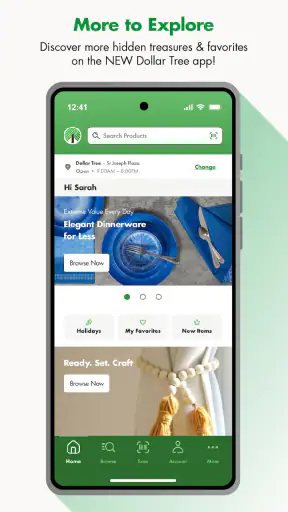
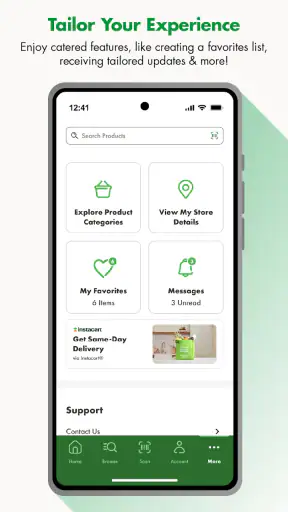
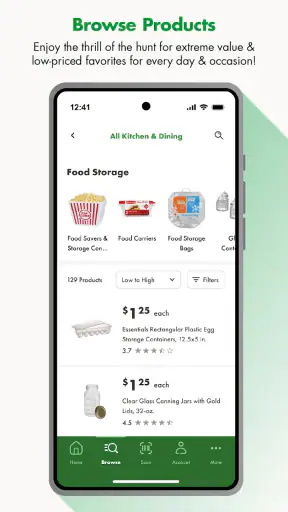
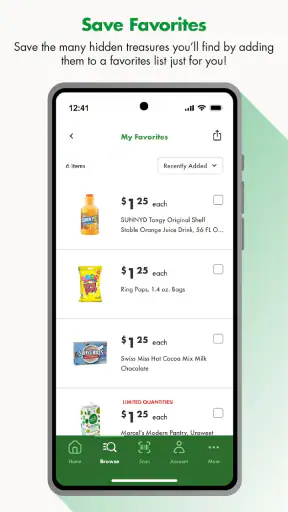
Shopping for small household items can be oddly time-consuming. I may only need a few storage pieces, cleaning supplies, or seasonal extras, yet I still want to know what is available before making a trip. Dollar Tree is designed for that kind of browsing: it brings the retailer’s hunt for inexpensive finds onto a phone and gives the experience a more convenient starting point than walking into a store without a plan.
I reviewed it as a shopping app rather than as a replacement for every part of an in-store visit. That distinction matters. The app is most useful when I want to explore the range of products associated with Dollar Tree, prepare for a quick shopping trip, or look for ideas when I do not have one exact item in mind. It feels less compelling for someone who expects a full supermarket-style ordering service with a perfectly predictable catalog, detailed product research, and a completely frictionless checkout journey.
What the Dollar Tree app is really useful for
Dollar Tree comes from Dollar Tree Stores and is available free of charge for shopping on compatible Android and iOS devices. It is rated for Everyone, which fits the straightforward nature of the experience: browsing products, considering purchases, and planning a visit do not require specialist knowledge. The app was released on February 23, 2024, and the current version is 1.5.4, so users should keep their device software reasonably current; the listed minimum is iOS or Android version 12.
The retailer describes the app as a way to take the thrill of the hunt further. In practical terms, I read that as an invitation to browse rather than a promise that every shopping task will be automated. Dollar Tree’s appeal has always included discovery. You may enter looking for party supplies and notice organizers, snacks, craft materials, or seasonal decorations along the way. A mobile version can make that discovery easier to begin at home, while still leaving room for the unpredictable nature of a physical store.
That makes it a particularly natural fit for three types of shoppers. First, it helps people who like to prepare a list before leaving home but do not want to spend time searching several unrelated websites. Second, it suits anyone looking for low-cost inspiration for a classroom activity, a party, a craft project, or basic home organization. Third, it can be useful for repeat customers who already understand Dollar Tree’s general selection and want a quicker way to browse before visiting.
I would be more cautious recommending it to someone who needs a guaranteed specific brand, exact size, or dependable local inventory. Discount retail changes quickly, and the excitement of finding an unexpected item is also what makes planning more difficult. If your purchase depends on one precise product being available at one precise location, a direct confirmation from the store may still be the safer step than relying on an app alone.
Trust starts with realistic expectations
The app has reached more than a million installs and holds a 3.6 average from roughly two and a half thousand ratings, alongside about a thousand written reviews. Those figures suggest a real user base, but they also tell me not to treat the experience as universally smooth. A middling average often reflects the difference between what shoppers expect from a modern retail app and what a particular retailer’s mobile experience actually delivers.
My trust in a shopping app is not based only on how attractive the product grid looks. I want to know what I am being asked to do, whether an account is necessary for the task I have in mind, and whether the app gives me clear choices around personal information and notifications. With this app, I would approach those questions deliberately instead of assuming that installing it automatically improves every part of shopping at Dollar Tree.
There is also an important difference between a retailer’s brand familiarity and the app experience itself. Dollar Tree Stores is a recognizable developer name, but that does not mean every screen will match the simplicity of a physical checkout. Mobile shopping can introduce sign-in prompts, location requests, saved details, and notifications. I recommend treating each request as a separate decision: allow what genuinely helps with your current task, and avoid granting access just because the prompt appears.
Controls I would check before browsing deeply
When I install a shopping app, I first look at the operating system’s permission controls rather than accepting everything in one tap. Location access is the most obvious example. If the app offers a store-related function that benefits from knowing where I am, I would prefer an option that limits access to the moment I am using that function, if my device presents one. If I am browsing general products from home, I would question whether continuous location access is necessary for me.
The same careful approach applies to notifications. Retail alerts can be useful when I have deliberately chosen to receive them, but they can also turn a simple browsing tool into a stream of reminders. I would begin with notifications disabled or limited, then enable only the types that have a clear purpose. This is not an accusation about the app; it is simply a sensible way to keep control over a shopping device that may otherwise compete for attention.
Account creation deserves similar attention. If I only want to browse, I would postpone signing in until the app clearly explains what an account adds. An account may be worthwhile for a shopping workflow that needs saved choices or a persistent basket, but it should not become an automatic exchange for merely looking around. I also prefer using a unique password for retail accounts and checking whether the app allows me to remove saved information later through visible settings.
These habits are more useful than a vague claim that an app is “secure” or “private.” They give me practical control. I can review permissions in the phone settings, revisit notification choices, and avoid storing information I do not need. The app’s value should come from helping me shop, not from encouraging me to hand over more access than the task requires.
Where personal information becomes more sensitive
The most sensitive moments in any retail app usually arrive when browsing turns into an action: selecting a store, creating an account, saving a basket, or moving toward a purchase. I slow down at those points. I check whether the screen is asking for information needed for the immediate task or inviting me to create a more permanent profile.
For Dollar Tree, I would separate casual discovery from purchase preparation. Casual discovery might mean looking through categories for ideas or checking whether a project is worth a store visit. That activity does not need to become a long-term record in my mind, so I would avoid signing in unnecessarily. Purchase preparation is different: if I am building a list or using a feature that requires an account, I would review the fields carefully and decide whether the convenience justifies the information requested.
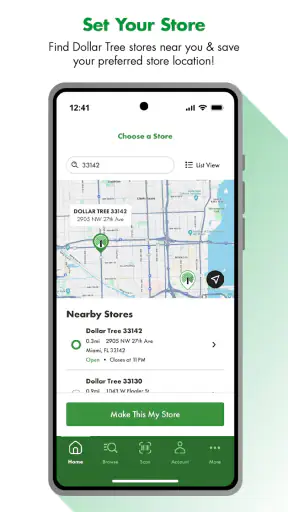
Location is another sensitive moment because it can connect a general shopping session with a specific place. I would rather choose a store manually when I already know where I am going than allow location access by default. That approach can take a few extra seconds, but it makes the relationship between the permission and the task much clearer.
I also pay attention to the boundary between product research and impulse buying. The app’s discovery-oriented design can be helpful when I need inspiration, yet browsing many inexpensive items can make it easy to add things simply because they look useful. My practical rule is to create a short purpose-based list before opening the app: “party table,” “closet organization,” or “classroom craft,” for example. That keeps the hunt enjoyable without letting it quietly replace a budget.
A better everyday workflow than opening it without a plan
My preferred workflow begins with a need, not with endless scrolling. Before opening the app, I write down the category of purchase and the maximum number of items I am willing to consider. Then I browse with a specific question: Can this help me prepare for the event? Does it solve the storage problem? Is it worth visiting the store for?
For a realistic example, imagine I am preparing a small birthday gathering at home. I might use the app to explore table decorations, disposable serving items, gift bags, or simple craft materials. I would make a shortlist, note alternatives in case the first choice is unavailable, and then visit a store with that list. The app helps me organize the idea stage, while the physical visit handles the reality that discount-store selection can change from one location or visit to another.
A useful trick is to save screenshots or write down product descriptions only when that helps me recognize an item later. I would not assume that seeing something in the app guarantees it will be waiting on a shelf. The more flexible the list, the more useful the app becomes. Instead of planning around one exact decoration, I might plan around a color or function. Instead of requiring one particular container, I might look for any piece that fits the intended space.
This workflow also makes the app easier to compare with the usual alternatives. A general search engine may offer more product variety but can send me across multiple retailers and make local availability harder to judge. A large marketplace may provide more detailed specifications, reviews, and delivery options, but it is less focused on the particular discovery experience associated with Dollar Tree. A store’s website may be better for formal product information, while this app is more appealing when I want a mobile window into the retailer’s changing assortment.
Where the experience may create friction
The central trade-off is convenience versus certainty. A mobile catalog can save me a trip when it answers a basic question, but it cannot remove every uncertainty from a physical discount-shopping experience. Product availability, presentation, and local selection may still influence what I actually find. I would therefore use the app as a planning aid, not as a guarantee that a particular shelf will match my screen.
Another possible friction point is the gap between browsing and completing a transaction. Some shoppers expect every retail app to provide a polished end-to-end journey: search, compare, reserve, pay, and track delivery. That expectation may be too broad for the way I would use this app. Its strongest role is helping me explore and prepare. If my priority is delivery speed, advanced filtering, extensive specifications, or a highly detailed review system, a larger online marketplace may be a better fit.
There is also a mental cost to discovery. The app can make inexpensive items feel easy to add, especially when I am browsing without a defined project. I would not call that a defect unique to this retailer, but it is relevant to the experience. A short list, a spending limit, and a willingness to accept substitutes make the app more useful and less distracting.
Who should install it, and who should skip it?
I think it is worth trying if you already shop at Dollar Tree and want a more organized way to explore before visiting. It is also a sensible option for parents, teachers, hosts, crafters, and renters who often need inexpensive supplies and enjoy comparing ideas rather than searching for one premium product. The Everyone age rating makes it approachable for ordinary household shopping, although adults should still guide younger users around account details and purchases.
I would skip it if you rarely shop at Dollar Tree, need highly technical product information, or depend on guaranteed local stock. I would also choose another service when delivery tracking, broad customer reviews, brand consistency, or precise product specifications matter more than discovering low-cost possibilities. Installing it will not automatically make a store visit worthwhile if the retailer’s assortment is not relevant to your needs.
For existing customers, the decision is easier: try it with a limited permission setup and a small shopping task. Browse without building a large basket, see whether the categories help you plan, and decide afterward whether an account or notifications add enough value. That trial gives a more honest answer than assuming the app must be essential simply because it comes from a familiar retailer.
My cautious verdict
Dollar Tree is a useful companion for discovery-led shopping, especially when I want ideas for everyday projects and a clearer plan before entering a store. Its free price and broad accessibility remove the main barrier to trying it, while the established developer and substantial install base provide context that this is not an obscure experiment. Still, the 3.6 average rating is a reminder to keep expectations measured.
My recommendation is to use it as a controlled planning tool, not as a substitute for judgment. Keep permissions narrow, delay account creation until it serves a clear purpose, manage notifications, and treat displayed products as possibilities rather than absolute promises about local shelves. Used that way, the app can make the familiar Dollar Tree hunt more convenient without taking away the flexibility that makes the retailer appealing in the first place.
In my experience, its best moment is the one before the trip: I can turn a vague need into a short list, consider alternatives, and arrive with a realistic idea of what I am looking for. Its weakest moment is when I expect the precision of a specialized online retailer. If you understand that trade-off, this shopping app is worth a careful try; if you need certainty above all else, a more inventory-focused alternative will likely serve you better.


